웹 역사 with node.js
1990년 웹이 등장하면서 수 많은 문서의 정보들이 HTML의 웹 페이지로 만들어짐.
1995년 최초 상업용 웹브라우저인 Netscape를 만든 넷스케이프 커뮤니케이션 사는 브랜든 아이크에게 Javascript 제작을 의뢰함.
Javascript으로 인해 HTML 문서가 사용자와 상호작용 하는 웹 어플리케이션으로 변모할 수 있게 됨.
단, 웹브라우저에 인터프리터가 있었기에 웹브라우저에서만 사용될 수 있는 독점적인 프로그래밍 언어이자 웹브라우저에 같혀있는 신세로 지내게 됨.
2008년 구글이 chrome에서 사용되는 javascript의 성능 개선을 위해 오픈소스 V8 엔진을 개발하게 됨.
node.js의 창시자 Ryan Dahl이 V8엔진을 기반으로 하는 node.js를 만들게 됨.
이 후 웹 개발자들은 node.js를 기반으로 웹 어플리케이션을 개발하게 됨.
node.js 설치
Node.js
Node.js® is a JavaScript runtime built on Chrome's V8 JavaScript engine.
nodejs.org
공식 홈페이지에서 설치
editor 선택 - VS Code
github에서 개발한 atom과 MS사의 visual basic code를 사용할 수 있는 것 같았고, 확인 결과 atom은 22년 12월 이후로 개발이 종료되어 VS Code로 설치함
atom.io -> https://github.blog/2022-06-08-sunsetting-atom/
Sunsetting Atom | The GitHub Blog
We are archiving Atom and all projects under the Atom organization for an official sunset on December 15, 2022.
github.blog
VS Code 설치 -> https://code.visualstudio.com/download
Download Visual Studio Code - Mac, Linux, Windows
Visual Studio Code is free and available on your favorite platform - Linux, macOS, and Windows. Download Visual Studio Code to experience a redefined code editor, optimized for building and debugging modern web and cloud applications.
code.visualstudio.com
node.js 입문 정리
npm - Node Package Manager
node.js도 Java의 maven 처럼 의존성 관리를 위한 툴이 존재함다.
npm
Bring the best of open source to you, your team, and your company Relied upon by more than 17 million developers worldwide, npm is committed to making JavaScript development elegant, productive, and safe. The free npm Registry has become the center of Java
www.npmjs.com
글씨를 아스키코드를 이용해 표현할 수 있는 figlet을 예시로 보며 npm 화면 이해
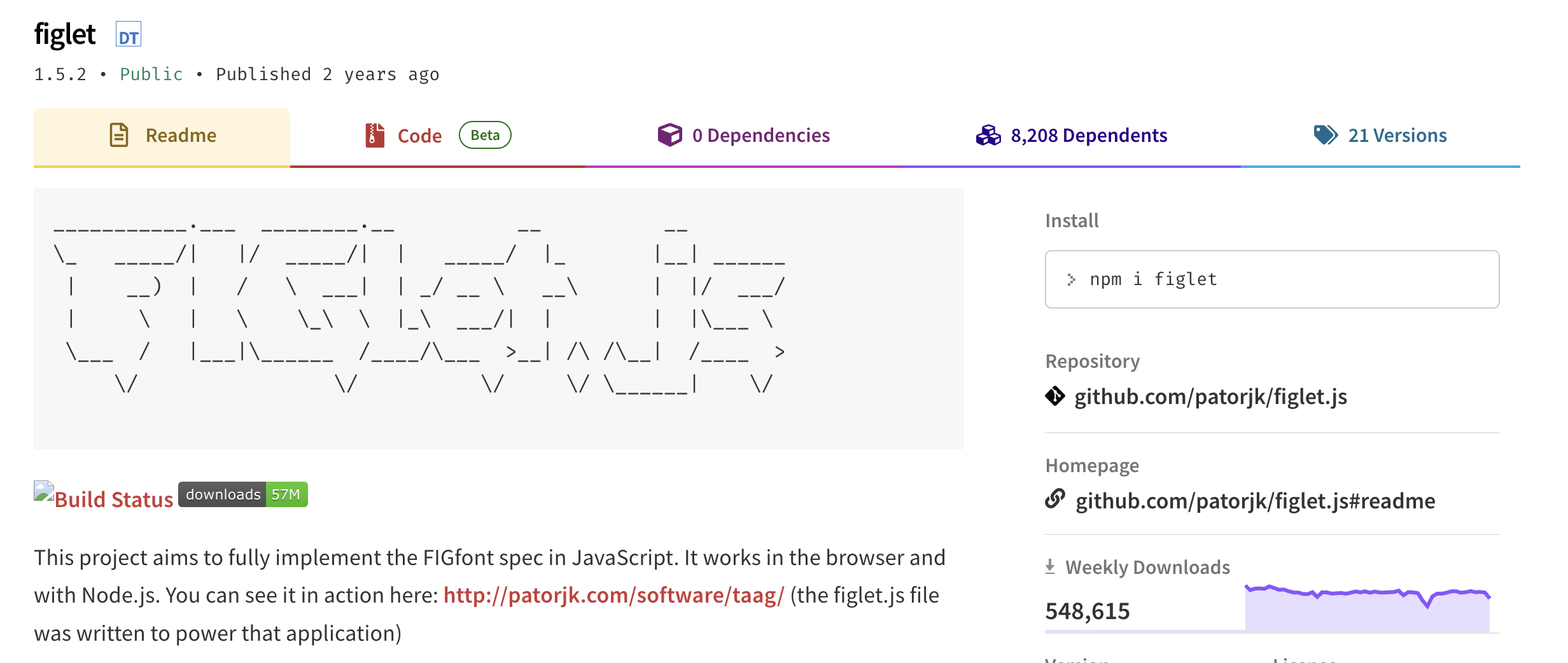
maven과 비슷한 정보를 담고 있으며 terminal 창에서 npm 명령어를 통해 설치가 가능하다. 간단한 설명과 사용 방법이 적혀져있다.
NPM 모듈 설치시 옵션
npm init			--- [0]

npm install figlet		--- [1]
npm i figlet			--- [2]

npm install figlet -g		--- [3]

npm uninstall figlet		--- [4]
[0] : 모듈을 관리하는 json 파일을 만들어줌. lock 파일이 더욱 디테일한 모듈 정보를 담고 있음.
[1] & [2] : 1과 2는 같은 의미. 약어 사용 가능
[3] : -g 옵션은 global 컴퓨터에 설치된 npm에 설치하여 모든 프로젝트에서 사용 가능해짐
[4] : 삭제하는 명령어 예시
Node.js - 웹 서버
1. js 내장 http를 이용한 응답 방식
require 함수는 java의 import 개념 필요한 module을 사용할 수 있도록 도와준다.
var http = require('http');
var fs = require('fs');
var app = http.createServer(function(request,response){
    var url = request.url;
    if(request.url == '/'){
      url = '/index.html';
    }
    if(request.url == '/favicon.ico'){
      response.writeHead(404);
      response.end();
      return;
    }
    response.writeHead(200);
    console.log(__dirname + url);
    response.end(fs.readFileSync(__dirname + url));

});
app.listen(3000);
http 모듈을 통해 app에 서버를 만들고 listen() 함수를 이용해 port로 들어오는 request를 받아보는 방식.
fs를 이용해 html 문서를 응답할 수 있음.
2. Express 모듈을 이용한 웹 API 서버
npm을 통해 Express 모듈을 설치 해주어야 한다.
const express = require('express')
const app = express()

app.get('/', function (req, res) {
  res.send('Hello World')
})

app.get('/user/:id', function (req, res) {
    //파라미터
    const p = req.params
    console.log(p)

    //{ } 같은 의미로 사용가능
    const { id } = req.params
    const js_id = req.params.id
    console.log(id == js_id) //true

    //쿼리
    const q = req.query
    console.log(q.name)
    console.log(q.gender)


    res.json({'userId':p.id, 'name':q.name, 'gender':q.gender})
})

app.post('/user/:id', function (req, res) {
    //바디 : axios or fetch -> req.body
    const b = req.body
    console.log(b)

    res.json({'message': 'body message'})
})

app.listen(3000)
node.js - CORS 설정
1. npm cors 설치
https://www.npmjs.com/package/cors
2. 사용
var cors = require('cors')	---[0]
var app = express()

app.use(cors())			---[1]
0번처럼 module을 넣어주고 1번을 통해 cors를 모든 요청 허용 처리할 수 있음.
'Web Dev > Node.js' 카테고리의 다른 글
| Node.js 기본 2 (0) | 2023.04.05 |
|---|